Living with arthritis doesn’t mean you have to give up on tracking your fitness goals. But let’s be honest, most activity trackers seem designed for people without joint pain or mobility challenges. The tiny clasps, stiff bands, and pressure points can make wearing a standard fitness tracker uncomfortable or even painful throughout the day.
The good news is that manufacturers are finally catching on. Several 2026 models prioritize comfort and accessibility while still delivering the tracking features you need. Here’s what actually works for arthritic wrists and fingers.
What Makes a Tracker Arthritis-Friendly?
Before we get into specific models, you need to know what features actually matter. Band width is crucial. Wider bands distribute pressure more evenly across your wrist, reducing those painful pressure points that narrow bands create. Look for bands at least 20mm wide, preferably wider.
Clasp design can make or break your experience. Magnetic closures and stretchy bands beat traditional buckles every time. You shouldn’t need to wrestle with tiny holes and pins when your fingers are stiff in the morning.
Weight matters more than you’d think. Even an extra 10 grams can feel heavy when you’re dealing with inflamed joints. The lightest trackers weigh around 20-25 grams, while some bulkier models hit 50 grams or more.
Top Picks for 2026
Fitbit Charge 6
The Fitbit Charge 6 continues to be a solid choice for arthritis sufferers. Its infinity band design uses a hook-and-loop fastener that’s incredibly easy to adjust and secure, even with limited hand mobility. You can fasten it with one hand, which is a genuine relief during flare-ups.
The screen responds to gentle touches, so you don’t need to press hard. Vibration alerts are adjustable, letting you set them strong enough to notice but gentle enough not to aggravate sensitive joints. The automatic activity tracking means you don’t need to fiddle with buttons before every walk. This pairs well with low-impact exercises designed for arthritis management.
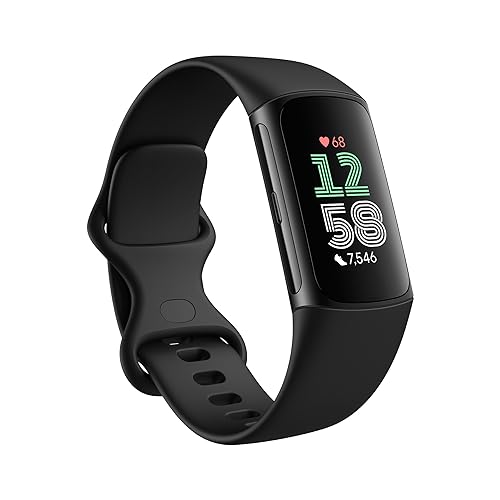
Fitbit Charge 6
Easy hook-and-loop band closure and lightweight design perfect for sensitive wrists
Garmin Vivosmart 5
The Vivosmart 5 weighs just 24.5 grams and features a slim profile that won’t catch on clothing or bump into things. The silicone band is soft and flexible, and the clasp is larger than most competitors, making it easier to grip and secure.
What sets this tracker apart is the sensitivity of its touchscreen. Even when your hands are swollen or you’re wearing compression gloves, it responds reliably. The all-day stress tracking is also helpful for managing arthritis, since stress often correlates with inflammation levels.
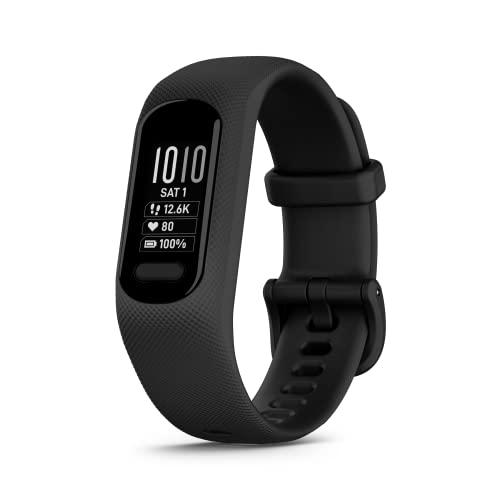
Garmin Vivosmart 5
Ultra-lightweight at 24.5 grams with an extra-responsive touchscreen that works even with compression gloves
Amazfit Band 7
For those looking for an affordable option, the Amazfit Band 7 delivers surprising comfort and functionality. The band is softer than many premium options, and the standard buckle is larger and easier to manipulate than typical fitness tracker clasps.
The display is bright and easy to read without straining, which helps when arthritis affects your neck mobility. Battery life extends to 18 days with typical use, reducing how often you need to remove it for charging. When combined with affordable home exercise equipment, you can create a complete fitness tracking system on a budget.
Accessories That Help
Consider picking up wider silicone replacement bands for your tracker. Third-party options often come in 22mm or 24mm widths that distribute pressure better than stock bands.
Some users find success with fabric bands that use Velcro closures. These eliminate pressure points entirely and adjust in seconds. They’re particularly helpful during flare-ups when even gentle pressure feels uncomfortable.
Frequently Asked Questions
Can I wear a fitness tracker over compression gloves or sleeves?
Most trackers won’t read your heart rate accurately through fabric. However, you can wear the tracker over a thin compression sleeve if you prioritize comfort over heart rate data. For the most accurate readings, position the tracker on bare skin but keep it loose enough not to constrict blood flow. Many newer models like the Charge 6 and Vivosmart 5 work well with a slightly looser fit.
Will the vibration alerts aggravate my arthritis?
This varies by person and device. Most modern trackers let you adjust vibration intensity or disable it completely. Start with the lowest setting and increase only if needed. Some users with severe arthritis prefer to disable vibrations entirely and rely on visual notifications instead. The Garmin and Fitbit models mentioned above offer particularly customizable alert settings that let you find your comfort zone. Whether you’re doing resistance band exercises or using pedal exercisers for low-impact cardio, these trackers can monitor your progress without causing additional discomfort.
This article contains affiliate links. We may earn a small commission at no extra cost to you.
Related Articles
- Best Arthritis-Friendly Exercises For Seniors In 2026
- 12 Resistance Band Exercises for Arthritis (Safe & Effective)
- Best Pedal Exercisers for Seniors: Low-Impact Cardio Guide
- Best Home Exercise Equipment for Seniors in 2026 Under $100