Walking is the most recommended exercise for seniors, but bad knees can turn every outdoor step into a negotiation with pain. A treadmill with the right cushioning system absorbs the impact that your knees can’t handle, letting you walk longer and more comfortably than pavement ever allows. The difference between a budget treadmill with a hard deck and a quality model with proper shock absorption is the difference between 10 painful minutes and 30 comfortable ones.
Here’s what matters most for knee-sensitive walkers and which models deliver it.
Features That Protect Your Knees
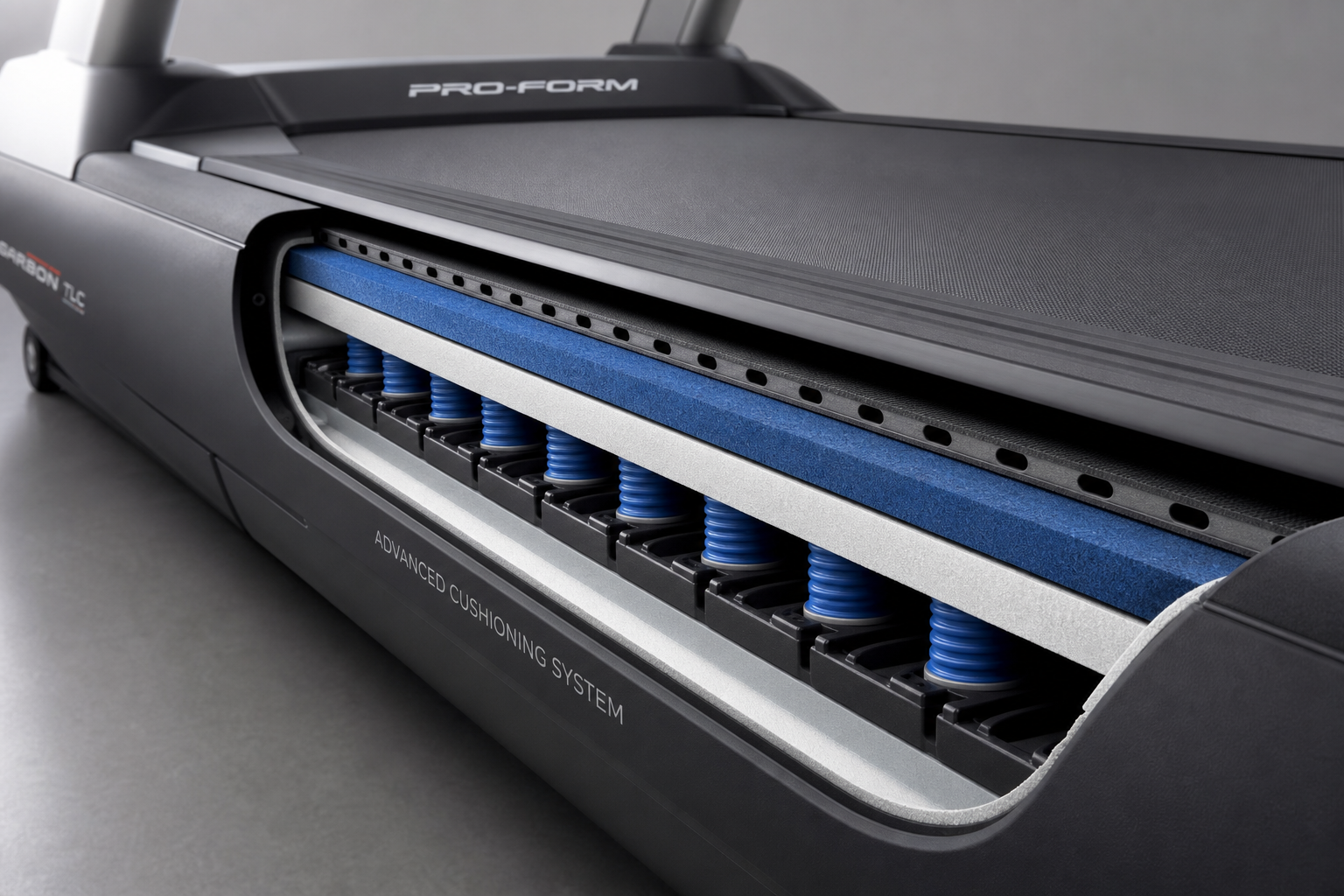
Deck Cushioning System
This is the single most important feature. A cushioned deck absorbs 15-40% of the impact force compared to walking on pavement. Look for treadmills that specifically advertise their cushioning technology (NordicTrack’s FlexSelect, Sole’s Cushion Flex Whisper Deck, Life Fitness’s FlexDeck). Avoid basic models with rigid, uncushioned decks that transmit full impact to your joints.
Some treadmills offer adjustable cushioning (firmer for a road-like feel, softer for maximum joint protection). For knee pain, always use the softest setting.
The construction of the cushioning system varies. Some manufacturers use rubber shock absorbers positioned at intervals under the deck. Others use a spring-based system that flexes with each step. A few high-end models incorporate gel or elastomer pads. The specific technology matters less than the measurable impact reduction, which should be at least 20% to make a meaningful difference for arthritic knees.
Cheaper treadmills sometimes advertise “cushioning” that amounts to little more than a thin foam pad under the belt. This provides minimal impact reduction. Read reviews from users with knee issues to verify that the cushioning delivers actual joint relief, not just marketing claims.
Speed Range
Most seniors with knee issues walk at 1.5-3.5 mph. Many treadmills have a minimum speed of 0.5 mph and increase in 0.1 mph increments, which gives you fine control over your pace. Avoid treadmills that start at 1.0 mph or jump in 0.5 mph increments, as these don’t allow the precise speed adjustments needed to find your comfort zone.
The ability to start very slowly is particularly important if you’re rehabbing from a knee injury or flare-up. A treadmill that starts at 1.0 mph forces you to begin at a pace that may already be too fast for a stiff joint. Starting at 0.5 mph lets you ease into movement gradually as your knee warms up.
Maximum speed is less relevant for knee-sensitive walkers. A top speed of 6-8 mph is more than enough. Running or jogging on a treadmill, even a cushioned one, still generates impact forces that arthritic knees don’t handle well. If you’re clearing your treadmill purchase with your doctor (which you should), they’ll likely recommend walking only.
Incline Options
A gentle incline (1-3%) shifts some of your body weight from a vertical load (which compresses the knee) to a horizontal push (which uses the glutes and hamstrings more). Many people with knee arthritis find that a slight incline is actually more comfortable than flat walking. Look for treadmills with motorized incline that adjusts in 0.5% increments.
Decline capability (negative incline) is also valuable. Walking downhill is the hardest movement for arthritic knees. If your treadmill stays flat or at a positive incline, you avoid the downhill stress entirely.
Motorized incline is worth the extra cost over manual adjustment. Stopping mid-workout to get off and manually adjust the incline interrupts your rhythm and requires you to restart your momentum. Motorized systems let you make micro-adjustments from the console without breaking stride.
Some advanced models offer one-touch incline presets. You can program your preferred settings (say, 2% for the first 10 minutes, 1% for the remainder) and the treadmill adjusts automatically. This is useful if you find that starting slightly steeper helps your knees warm up, then backing off maintains comfort for the longer haul.
Steep inclines (10% and above) are mostly irrelevant for knee-sensitive walkers. They increase the load on the kneecap and quadriceps tendon, which can aggravate patellofemoral pain. The incline feature’s value is in the 0-5% range, where you can fine-tune joint comfort.
Handrails and Safety Features
Sturdy, full-length handrails provide balance support for seniors who feel unsteady. Short side rails that end at the console aren’t long enough for continuous support during walking. Look for rails that extend the full length of the walking deck. An emergency stop clip (attached to your clothing) stops the belt instantly if you stumble.
Handrail placement matters. They should be at a height that lets you rest your hands lightly without hunching your shoulders or leaning heavily forward. Leaning too much shifts your center of gravity and can actually increase knee stress. The rails are for balance and security, not for bearing significant body weight.
Some treadmills have handrail-mounted controls for speed and incline. These are convenient but can encourage you to grip the rails constantly, which alters your gait and reduces the workout’s effectiveness. Console-mounted controls force you to let go, which is better for walking form. If handrail controls are included, use them sparingly.
The emergency stop clip is non-negotiable. Thread the cord through your waistband or clip it to your shirt. If you trip or feel dizzy, the magnetic clip detaches and the belt stops immediately. This prevents the treadmill from continuing to run while you’re on the floor, which can cause serious injury. Test the clip before your first real workout to make sure it stops the belt instantly.
Belt Width and Length
A wider belt (20 inches or more) gives you room to walk naturally without worrying about stepping off the edge. A longer belt (55-60 inches) accommodates longer strides and gives you more time to react if your balance wavers. Budget treadmills with narrow, short belts feel confining and increase anxiety.
Belt width is more important than length for most walkers. A 20-inch belt allows a natural stride width and doesn’t make you feel like you’re walking a tightrope. Belts narrower than 18 inches force you to walk with your feet closer together than natural, which can throw off your balance and create awkward stress on the knee joint.
Belt length becomes relevant if you’re tall or have a longer stride. A 55-inch belt is adequate for most walkers under 6 feet tall. Taller individuals or those with longer strides may prefer 60 inches. Shorter belts feel rushed and claustrophobic, especially if you’re walking at a faster pace.
The belt surface texture also affects comfort. Smoother belts are quieter but can feel slippery if you sweat. Textured belts provide better traction but wear out shoes faster. For walking (not running), a lightly textured belt strikes the right balance.
Motor Power
A continuous-duty horsepower (CHP) rating of at least 2.5 is recommended for walking. Lower-powered motors strain and overheat during extended use, leading to inconsistent belt speed and premature motor failure. A 3.0+ CHP motor runs cooler and maintains steady speed even as you tire and your weight shifts slightly with each step.
The motor’s smoothness affects joint comfort. A cheap, underpowered motor produces a jerky, uneven belt motion that can jar your knees. Quality motors deliver consistent speed without the micro-stutters that translate into impact spikes. If possible, test a treadmill in person and notice whether the belt maintains perfectly smooth, predictable motion.
Console and Display
Large, clear displays are easier to read without leaning forward or squinting. Backlit screens work best in varied lighting. The console should show speed, time, distance, and incline at a glance. Heart rate monitoring is useful but not essential for most walkers.
Overly complicated consoles with dozens of pre-programmed workouts and touchscreens can be more frustrating than helpful. Simple controls (speed up, speed down, incline up, incline down, start, stop) are all most seniors need. If the console requires navigating multiple menus just to start a basic walk, it’s poorly designed for your needs.
Built-in speakers and tablet holders are nice conveniences. Listening to music or watching a show makes longer walks pass faster. Make sure the tablet holder is stable and positioned so you can see the screen without craning your neck down, which can affect your walking posture.
Top Treadmills for Seniors with Bad Knees

Sole F63

Sole F63 Treadmill
Best overall for knee protection with 40% impact reduction cushioning system
The Sole F63 features the Cushion Flex Whisper Deck that reduces impact by up to 40% compared to road walking. The 20-inch wide belt provides comfortable walking room, and the speed starts at 0.5 mph with 0.1 mph increments. The incline goes from 0 to 15% with motorized adjustment. Built-in speakers and a tablet holder make long sessions more enjoyable.
The F63’s 3.0 CHP motor is more than adequate for walking and runs quietly. The folding design is useful if space is tight, though the unit is heavy (about 190 pounds) and requires two people to move safely. The console is simple with minimal learning curve. Large buttons make it easy to adjust speed and incline mid-walk without fumbling.
Sole backs the F63 with a solid warranty: lifetime frame and motor, three years on parts, one year on labor. This suggests confidence in the product’s durability. Customer reviews consistently mention the cushioning as noticeably softer than budget models, with many users reporting they can walk significantly longer before knee pain sets in.
The F63 does not include a decline feature. If downhill training is important to you, look elsewhere. For most knee-sensitive walkers, this limitation is actually a benefit since decline walking is harder on arthritic joints anyway.
Best for: Most seniors with knee pain. Excellent cushioning at a mid-range price point.
NordicTrack Commercial Series

NordicTrack Commercial Treadmill
Tech-savvy option with adjustable cushioning and guided iFIT workouts
The NordicTrack Commercial series features FlexSelect cushioning that can be toggled between a softer, more cushioned feel and a firmer road-like feel. The HD touchscreen provides iFIT guided workouts (subscription required) that automatically adjust speed and incline. The decline capability (down to -3%) lets you simulate gentle downhill walking in a controlled way.
The Commercial series includes several models at different price points. The 1750 and 2950 are the most popular. Both offer powerful motors (3.75-4.25 CHP), spacious belts (20-22 inches wide, 60 inches long), and inclines up to 15%. The larger touchscreen on the 2950 (22 inches versus 14 inches) is easier on aging eyes but adds to the cost.
iFIT integration is a double-edged sword. The guided workouts can be motivating, and the automatic speed and incline adjustments add variety. However, the subscription costs extra after the initial trial period. If you’re not interested in virtual workouts, you’re paying for technology you won’t use. The treadmill works fine in manual mode without iFIT, but the large touchscreen feels underutilized.
The decline feature is genuinely useful for controlled strength work, but use it cautiously. Decline walking increases eccentric loading on the quadriceps and braking forces on the knee joint. Start with very slight declines (-1%) and short durations to see how your knees respond.
Assembly is more complex than simpler models. Expect to spend 2-3 hours or hire professional assembly. Once set up, the unit is stable and quiet during use.
Best for: Tech-savvy seniors who want guided workouts and adjustable cushioning options.
Horizon T101
The Horizon T101 is the best budget option that still delivers decent cushioning. The 3-zone cushioning system absorbs impact at the front of the deck (where your heel strikes) and provides a firmer push-off at the back. The 20-inch belt and 55-inch length are adequate for walking. Bluetooth connectivity lets you use free apps for tracking workouts.
The T101 cuts costs with a 2.5 CHP motor (the minimum acceptable for regular walking) and a simpler console. The display is LCD rather than touchscreen, and there are no built-in workout programs. For basic walking sessions where you set your own speed and incline, these omissions don’t matter.
The cushioning is noticeably better than rock-bottom budget treadmills but not as plush as the Sole F63 or premium models. If you have mild to moderate knee discomfort, the T101 provides meaningful impact reduction. If you have severe arthritis or post-surgical limitations, investing in better cushioning is worth the extra cost.
The frame is lighter (about 160 pounds) and easier to move than heavier treadmills. The folding mechanism is simple. The warranty is shorter (lifetime frame, one year parts and labor), reflecting the lower price point.
The T101 works well with fitness apps like Zwift or FitShow, which provide free virtual walking routes and basic tracking. This adds variety without the recurring cost of a subscription service.
Best for: Budget-conscious buyers who want better cushioning than the cheapest treadmills without the premium price.
Life Fitness T3 (Premium Option)

Life Fitness T3 Treadmill
Commercial-grade durability and cushioning for long-term daily use
The Life Fitness T3 uses FlexDeck shock absorption, the same technology found in commercial gym treadmills. It reduces impact by up to 30% and is built to last for decades of daily use. The construction quality is noticeably superior to consumer-grade models. The premium price reflects commercial-grade durability and the smoothest walking experience available for home use.
The T3’s build quality is evident immediately. Heavier gauge steel, precision-machined components, and a rock-solid feel during use separate it from consumer treadmills. The belt runs whisper-quiet, and the motor maintains perfectly consistent speed. The deck cushioning system uses elastomer components that don’t compress or degrade over time like foam-based systems.
The console is simple and intuitive. Large LED displays show essential data without the dist